
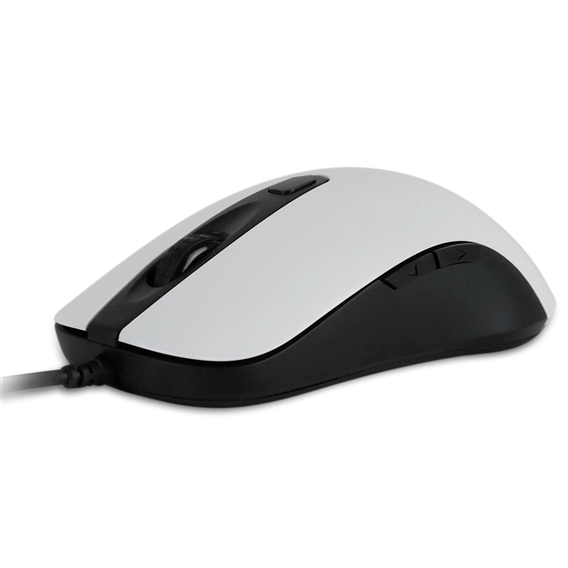
The Nixeus Revel is a budget-friendly, no-frills gaming mouse that would shine more brightly if it wasn’t so darn shiny.
The Nixeus Revel is very similar in design to the SteelSeries Sensei and Sensei [RAW] gaming mice. Unfortunately, it takes more after the former in design and the latter in price, but in this case that’s not really a good thing.
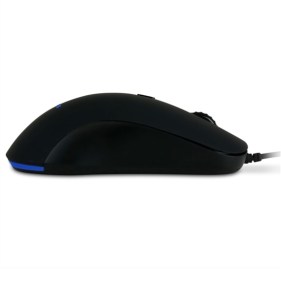
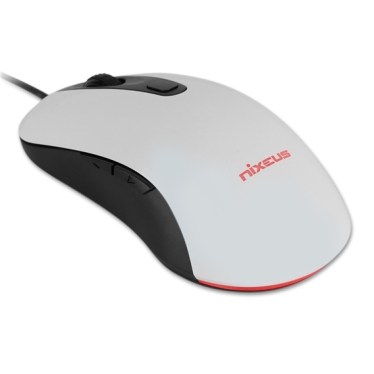
The Nixeus Revel is a minimalist design with an ambidextrous shape, although it’s not a true ambidextrous mouse because it only has thumb buttons on one side. A single button for switching DPI settings sits behind the scroll wheel, and the thumb buttons are long and narrow.
The thumb buttons jut out from the side enough to make them fairly easy to find, although personally I prefer larger thumb buttons such as those found on the Razer Mamba and Deathadder.
Nixeus Revel Feature highlights and specifications
The Nixeus Revel comes pre-configured with 8 DPI settings (ranging from 400-120000), 1000Hz polling rate, and it’s backed by Omron switches. It’s a basic gaming mouse with a conservative, neutral form factor and an entry-level price of around $40-50.
Nixeus Revel technical specifications
- Optical Sensor: PixArt PMW3360
- DPI Settings: 400/800/1200/1600/2000/3200/5000/12000
- Omron Switch Durability: 20 million clicks (Primary Left/Right Buttons)
- USB Polling Rate: 1000Hz (1 ms)
- Programmable Buttons: 5
- Approximate Size: 125.7mm (4.95″) x 67.5mm (2.66″) x 39mm (1.54″)
- Approximate Weight: 85 grams (Without Cable)
- USB Cable Length: 1.8 meters (6 feet)
- Operating System: Windows XP/Vista/7/8/10 & Mac OS
- Warranty: 1 Year Limited Warranty by Nixeus
The Nixeus Revel doesn’t use or require any software drivers, so all of its features are ‘hard wired’ into the mouse. It simplifies the mice in that it doesn’t require any configuration, but you also can’t customize it, record or create macros, etc.
This also makes Nixeus’ claim of “programmable” buttons a bit misleading. Most programmable gaming mice enable you to assign macros and configure the buttons however you please. The Nixeus Revel’s programmability is completely dependent on whether or not a game enables you to re-assign the scroll wheel or “Back” and “Forward” buttons (the default commands for the thumb buttons) to other in-game functions.
Performance
The Nixeus Revel does a good job of providing the essential functions of a gaming mouse for a modest price (around $45 as of this writing). It provides an ample number of DPI settings and (for me at least) provides the settings I typically use (generally between 1200 and 2400 DPI). Its lack of software keeps things simple, but sacrifices customization and feature options.
The scroll wheel isn’t as tactile or firm as I prefer for gaming, but neither is it deficient. The left, right, and scroll-click buttons all deliver a satisfying, tactile ‘click’ experience typical of Omron switches.
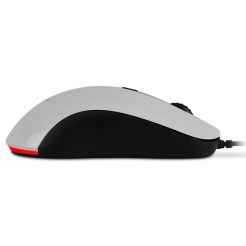
The Nixeus Revel’s worst sin is that it’s covered in shiny, glossy plastic (white or black depending on the model).
Glossy plastic is the least grip-friendly and least comfortable construction material that can be used on a mouse. (See my Gaming mouse buyer’s guide for some of my recommendations.)
Glossy plastic gives gaming mice a sleek, sports-car like look that looks good on the desktop and (according to sources in the industry) tends to be more popular in Asian countries. Unfortunately, it quickly develops a tacky feel after only 30 minutes or less of use, and it attracts smudges. After a brief period of gaming I feel like I need to lift my hand and wipe it off every few minutes.
the entire top of the Nixeus Revel is made from glossy plastic, so there’s no avoiding it—even for you palm-up/fingertip mousers.
Overall 6.5/10*
For less than $50 the Nixeus Revel is a decent, minimalist gaming mouse. If you don’t hate glossy plastic as much as I do it’s a perfectly fine budget-level mouse.
[*EDIT: Apparently the black version of the Revel gaming mouse isn’t glossy, so I’d recommend looking at that one. Also, I’d rate it 1-2 points higher.]
Also consider the SteelSeries Sensei Raw, which sports a nearly identical form factor and only costs $10 more. The Sensei Raw is covered in soft-touch rubber, provides more features through the SteelSeries Engine software, and is on my personal Best Gaming Mice list.


There’s a black non-gloss version. You know you guys probably just get handed random things and you review it, but you should know this.
It does look (from pictures anyway) like the black one isn’t glossy, although when they offered to send me one to review they only asked “black or white” in the email, so assumed they were the same construction except for the color. However, take away the glossy plastic and it’s even better as a budget-level gaming mouse for sure. I’d still tend to recommend the SteelSeries Sensei Raw however. It offers more overall flexibility through its driver software, even if it doesn’t (currently) offer as high a maximum resolution (DPI).
I’d just like to throw out there that it is a completed bad idea to recommend anyone to get the Sensei Raw over this. I’m not trying to be rude here, but I feel that if writing articles for a tech blog is your job, you should be researching this a lot more. The Sensei has a MUCH inferior laser sensor, which is in every way worse for a FPS gamer than an optical sensor. Not only that, but it uses the 3360, which is arguably the best sensor on the market right now, and all at an affordable price. There’s also the fact that you weren’t aware it came in 2 different coatings. All in all, I feel that this article reads from an outside looking in viewpoint, rather than someone who actually knows the ins and outs of what makes a truly great gaming mouse. As I’ve said, not trying to be mean here, but you should really take the time to research these things, especially if you’re going to be recommending someone a far inferior product which costs more money for absolutely no reason.
A) My blog/site is not my job; I just do it for fun, although I have been a professional freelance writer for many years for various sites, magazines, etc. But this is mostly for fun.
B) I like the Sensei Raw. Never had any issues with it when I reviewed it years ago in FPS or any other games. My opinions are based on using the product, not numbers on a box or hypothetical speculation about things such as “sensor X is better for X kinds of games”. Also, they are opinions, as all reviews are.
C) My Nixeus contact never informed me the 2 versions were different. He only asked if I wanted to review a white or black one. Regardless, the white one is the one I reviewed. I’m not really obliged to mention the other one because I didn’t review it — but I added a couple notes about the black version of the Revel once my contact confirmed that they were different.
E) I made my reasons for the recommending the Sensei Raw as a possible alternative in the same price point clear in the review.